
Wondering how to expand the storage. If I put 8tb drives in x 4.. when I go to migration using the old utility, it shows a max of 9tb. Is there a way to change to higher?
Expand Pegasus3 r4 storage
- 1.8K Views
- Last Post 22 April 2026

Frank Bosma
posted this
27 March 2026
- Last edited 27 March 2026
Yes, it is possible to expand the storage capacity after exchanging the Pegasus disks for larger ones.
You can follow the instructions in our knowledgebase:
https://kb.promise.com/thread/increasing-the-storage-capacity-of-a-pegasus-lun-by-rebuilding-with-larger-drives/
G Mat
posted this
12 April 2026
- Last edited 12 April 2026
Ok, got it loaded up with new drives.. I set it to 4 x 8 TB raid 5.. so 24 useable space.. worked a treat, no problem.. UNTILL
I powered down, and upon powering back up its no longer mounting. screen shots attatched and service report attatched

Frank Bosma
posted this
13 April 2026
Can you clarify if there is (was) any data on the logical drive when you expanded the disk capacity ?
Since the event log shows below and I see no events related to a rebuild of any of the existing disks to the larger ones:

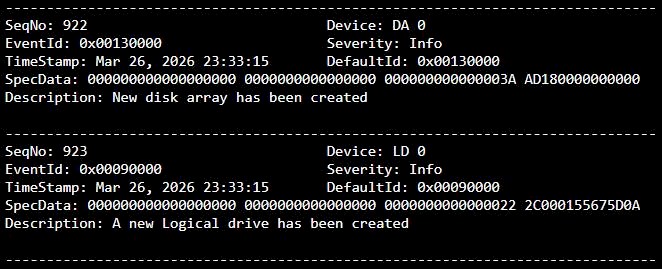
If no data needs to be saved then you should be able to clear the pfa state of the disks in the utility.
This can also be done in cli:
- open terminal
- type: promiseutilpro
- type: phydrv -a clear -t pfa -p 1
- type: phydrv -a clear -t pfa -p 2
- type: phydrv -a clear -t pfa -p 3
- type: phydrv -a clear -t pfa -p 4
- type: exit
Now you can re-create the disk array and logical drive in the utility dashboard.
R P
posted this
13 April 2026
Hi Matt,
I was wondering why the disks went PFA so I checked the SMART data.
These disks show only a few hundred power on hours, but they also show roughly 20TB of data written and read from the disks.
For example, from PD1
 9 Power_On_Hours
    0x0032  100   100   000    Old_age   Always     -            221
241 Total_LBAs_Written
    0x0000  100   253   000    Old_age   Offline    -            35652448458
242 Total_LBAs_Read
    0x0000  100   253   000    Old_age   Offline    -            25565478392
This is impossible if you bought these disks new.
And they also show a massive number of blocks recovered by way of ECC
195 Hardware_ECC_Recovered
    0x001a  079   064   000    Old_age   Always     -            77779380
My guess is that these are old disks and the SMART Power On Hours field was modified.
At any rate, chances are they will go PFA again for the same reason.
It is suggested to not put important data on these drives until you are sure they are functioning properly.
G Mat
posted this
13 April 2026
Thats for checking.
I replaced each drive one at a time and it re built the redundency. So 4 x 4TB to 4 x 8Tb. It wasnt registaring the added space, so i pulled everything off it, and started a new logical drive from scratch.. as raid 5.
it gave me 32TB with 24TB usable. I was able to move data onto it no problem at all.
After the power down, it came back up with these errors.
Theres about 19-21Tb on it that I would love to access if posible. Its not mounting at all.
I just powered on and for a moment everything was blue light and it actually said there was an array/ volume.. but did not mount.
but then it just went back to being red on the promise app, but still blue lights on the ext of the raid.
In the Promise Utility Pro, the drives come up as "abnormal drives" with PFA status, with the "help" option saying i can 'Reuse". Is this basicly asking to acept theres and issue and they will come back up?
in the "calssic" promise utility, its showing 0 array/ logic drives.. but is showing 24tb configured and 8tb unconfigured
added an updated service report if that helps at all.
G Mat
posted this
13 April 2026
OK.. so I managed to replicate it having an array again for a breif moment and saved a service report for that moment incase that helps.
G Mat
posted this
20 April 2026
Just wondering if anyone had any suggestions on this one.
Thank you
R P
posted this
21 April 2026
- Last edited 27 April 2026
Hi Matt,
There is something wrong with the disk drives you are using and you were advised not to put any important data on them.
Generallly you should never use a PFA drive and it's bad advice to clear a PFA state and reuse the drive. You just found our why.
Suggestion, get some new drives and don't use any drive that has gone PFA. If you can return the PFA drives.
G Mat
posted this
21 April 2026
Ok. To be clear.. I havnt put any new data on them since they went PSA.. I cant.. it wont mount.
In the Promise Utility Pro, the drives come up as "abnormal drives" with PFA status, with the "help" option saying i can 'Reuse". Is this basicly asking to accept there is an issue and they will then come back up? even for a moment to get data off?
G Mat
posted this
21 April 2026
starting the raid up again, i have 3 x stale drives and 1 x PFA.
R P
posted this
22 April 2026
Hi Mat,
Is this basicly asking to accept there is an issue and they will then come back up? even for a moment to get data off?
What is it that you want to do?
If you have no important data on the drives your best bet is to get new drives and create a new LUN+array.
Otherwise you have to choose how much money you want to spend on recovery.
These drives apparently did not stay online long enough for copying off files.
If you need to recover the data the two options are to use a drive repair service and recreate the array or use a data recovery service.
The array was lost but it can probably be recreated. But posting the instructions here has led to trouble as forum posters often do more than just follow instructions. So if you want help recreating the array after disk repair you should register the Pegasus and open a support ticket at support.promise.com. Given the state of the disks it is not certain that data recovery will be possible.
The other option is to use a data recovery service. This is the more expensive option.
