Pegasus r4 and Mac Studio - Two drives dead

  • 41 Views
  • Last Post 3 days ago
  • Topic Is Solved
Cristiano Palazzini posted this 5 days ago

Hello,

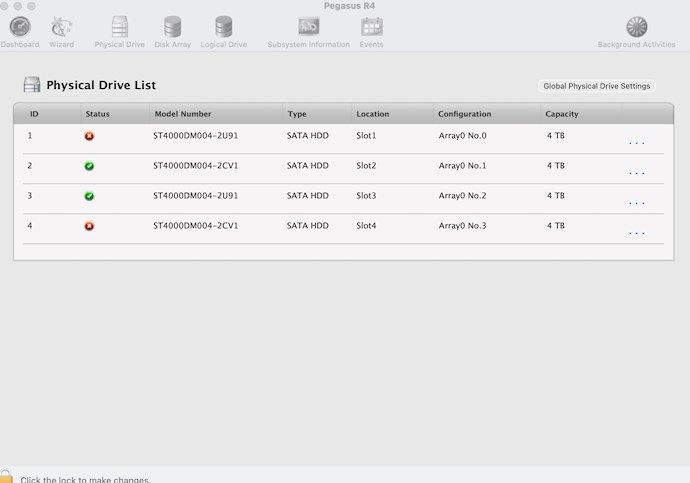
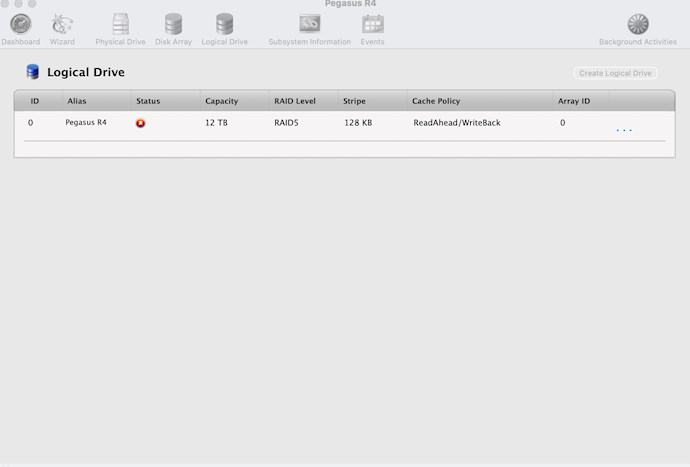
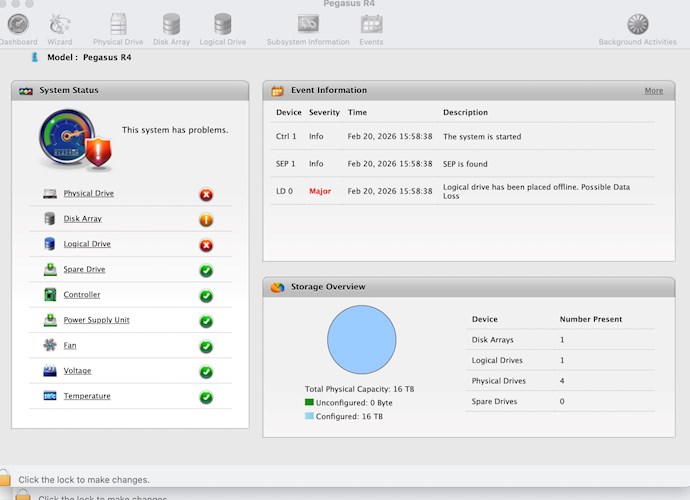
I have an old Pegasus R4 unit connected to a Mac Studio. All drives are almost new. Replaced a few months ago after a dead drive problem. Now I have a Raid5 configuration and a few days ago I found my unit with 2 dead drives. I try to attach a few screenshots.

Any suggestion, any hope I can recover my data?

Thank you, Cristiano
 

Order By: Standard | Latest | Votes
Frank Bosma posted this 5 days ago

Hi  Cristiano,

please create a service report in the utility, zip it and then attach it here.

It should be possible to restore the RAID drive back to normal but which steps to follow depend on the current exact state and occurrance of events shown in the report.

Seems like same issue as reported in this forum post.

Kind regards,
Frank

Cristiano Palazzini posted this 4 days ago

Hello Frank,

thank you for your quick answer and suggestion.

I am enclosing the servixce report and the events report. I will wait for your feedback before trying anything, just to avoid doing something even worse!

Thank you and kid regards,

Cristiano


Attached Files

Frank Bosma posted this 4 days ago

Hi Cristiano,

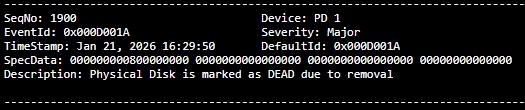
in this case disk #1 was marked dead due to removal on January 21st at 16:29.


Then disk #4 was marked dead due to forced offline state 1 hour later, so at 17:29.
This caused the logical drive to go offline, however it was in critical state for 1 hour.


I do not see any physical issues with any of the disks in the SMART log, so no reallocated or pending sectors and no read, seek or crc errors and all disks are fairly new (between 97 and 141 operational hours).

I can not see what caused the removal or forced offline events of the disks and the unit is on the latest available firmware version.

In this case I would recommend to force ONLY disk #4 online using below cli commands: (since it was the last disk to be marked dead)

- open a terminal window
- type: promiseutil (this will open the utility in cli mode)
- type: phydrv (check that both disks 1 and 4 are marked dead)
- type: phydrv -a online -p 4

> the LED on disk #4 should turn blue and the logical drive should mount again although it is in critical state, the array should show degraded state.
> check again with command phydrv that disk #1 is still marked dead and disk #4 is marked as forced online.

You can now close the terminal window and start a rebuild on the 'dead' disk #1 in the utility.
This can be done from either the Array section or the background activities section.
Please make sure the utility is unlocked in the bottom left corner to make the rebuild option available.

You CAN use the system while rebuild is running, however it will slow down the progress somewhat so if you have the opportunity just leave it running without writing to it.
With your 4TB disks a rebuild should take somewhere between 6 to 8 hours I believe.
In the background activities settings you can change the rebuild rate to high if not already.

Please let me know if you encounter any difficulties with above.

Please do NOT use the force online procedure in case of a single disk failure, or on both disks if some time passed between 1st and 2nd disk failure as is the case here.
This will most likely result in corrupted or damaged filesystem and/or files.
If only 1 disk is marked dead due to removal and the array is critical but the drive is not offline then you can simply start a rebuild on the 'dead' disk to get the disk back online.

Kind regards,
Frank

Cristiano Palazzini posted this 4 days ago

Hello Frank,

thank you again very much for your help. I was very much worried about the possible disaster.

I managed to follow your instructions and now the drive is rebuilding. Touching wood, it will be back!

It is very strange, it never happened to me and I don't know what caused the forced removal because I am sure I did not do that.

The Pegasus 1 is connected to a Pegasus2 both with an adapter to my Mac Studio. I guess it should have been something with the powerline. The Pegasus2 is on a UPS but not the One. 

Thank you again, I will let you know if the drive is back.

Cristiano

Cristiano Palazzini posted this 3 days ago

Hello Frank,

thank you again. The system is back to life!

Kind regards anb, again, many thanks for the support.

Cristiano

  • Liked by
  • Frank Bosma
Frank Bosma posted this 3 days ago

Great, thanks for the feedback !

Close